
AI Sales Automation Platform
In this project, I built an end-to-end AI sales automation platform that combines outbound prospecting with inbound customer engagement. The platform discovers qualified prospects, stores them in a CRM, generates personalised outreach drafts, records inbound opportunities, and schedules product demonstrations automatically.
The solution is orchestrated through six modular n8n workflows and integrates Pipedrive, Gmail, Google Calendar, Google Drive, Firecrawl MCP, Pushover, and a voice-based account executive agent. Each workflow has a focused responsibility, allowing the complete sales process to remain modular, traceable, and extensible.
🔗 Project Links
- GitHub Repository: https://github.com/seyyednavid/ai-sales-automation-platform
- Video Demonstration: Watch the complete end-to-end demo on YouTube
Table of Contents
- 00. Project Overview
- 01. Platform Architecture
- 02. Business Development Manager
- 03. Prospecting Sub-Agent
- 04. RevOps Sub-Agent
- 05. SDR Sub-Agent
- 06. Account Executive Voice Agent
- 07. Deal Recording Sub-Agent
- 08. Demo Booking Sub-Agent
- 09. End-to-End Demonstration
- 10. Reliability, Safety and Human Control
- 11. Technical Decisions and Trade-Offs
- 12. Current Limitations
- 13. Growth & Next Steps
00. Project Overview
Context
A typical sales process requires several disconnected activities: defining an Ideal Customer Profile, researching target companies, identifying decision makers, creating CRM records, writing outreach messages, handling inbound calls, recording opportunities, and scheduling demonstrations.
When these tasks are performed manually, they consume substantial time and create inconsistent hand-offs between business development and account executive teams. Fully autonomous sales automation also introduces risks if agents create duplicate records, invent prospect information, send unreviewed messages, or schedule meetings without checking availability.
The goal of this project was to build a modular AI Sales Automation Platform that automates repetitive sales operations while keeping the workflows observable and the generated outreach under human review.
Actions
I designed and implemented a platform that:
- Watches a Google Drive folder for a newly uploaded Ideal Customer Profile document
- Downloads the file and extracts the ICP text automatically
- Uses a manager agent to coordinate three outbound sales sub-agents
- Searches online for qualified companies and decision makers
- Returns structured prospect data including company, role, email, source, and qualification rationale
- Stores organisations, people, and leads in Pipedrive CRM
- Generates personalised HTML outreach emails and saves them as Gmail drafts
- Supports inbound customer calls through a voice-based account executive agent
- Records qualified inbound callers as Pipedrive deals
- Checks Google Calendar availability before booking a product demonstration
- Creates calendar events and returns booking results to the caller
- Sends operational success or failure notifications through Pushover
- Uses structured output parsers to keep agent responses machine-readable
Results
The completed prototype demonstrates a connected sales lifecycle across outbound and inbound channels:
- An ICP document automatically starts the outbound workflow
- The prospecting agent identifies qualified companies and decision makers
- Prospect details are written to Pipedrive as organisations, people, and leads
- The SDR agent prepares Gmail drafts rather than sending emails automatically
- Prospects can call the business and speak with the account executive agent
- The caller is matched against an existing Pipedrive contact
- A new deal is created for the qualified opportunity
- Calendar availability is checked before a demonstration is booked
- A Google Calendar event is created with the prospect and meeting details
- Success and failure paths generate operational notifications
The result is a practical portfolio demonstration of multi-agent orchestration, CRM automation, voice interaction, workflow composition, structured outputs, and cross-platform integrations.
Growth / Next Steps
The next stage would add stronger duplicate detection, automatic lead scoring, follow-up sequences, conversation analytics, authenticated dashboards, evaluation datasets, and production monitoring across all six workflows.
01. Platform Architecture
The platform is divided into two connected but independently deployable pipelines.
Outbound Business Development Pipeline
ICP PDF uploaded to Google Drive
        ↓
Business Development Manager
        ↓
Prospecting Sub-Agent
        ↓
RevOps Sub-Agent
        ↓
Pipedrive CRM
        ↓
SDR Sub-Agent
        ↓
Gmail Drafts
Inbound Account Executive Pipeline
Prospect receives outreach and calls the business
        ↓
Voice Account Executive Agent
        ↓
Deal Recording Tool
        ↓
Pipedrive Deal
        ↓
Demo Booking Tool
        ↓
Google Calendar Event
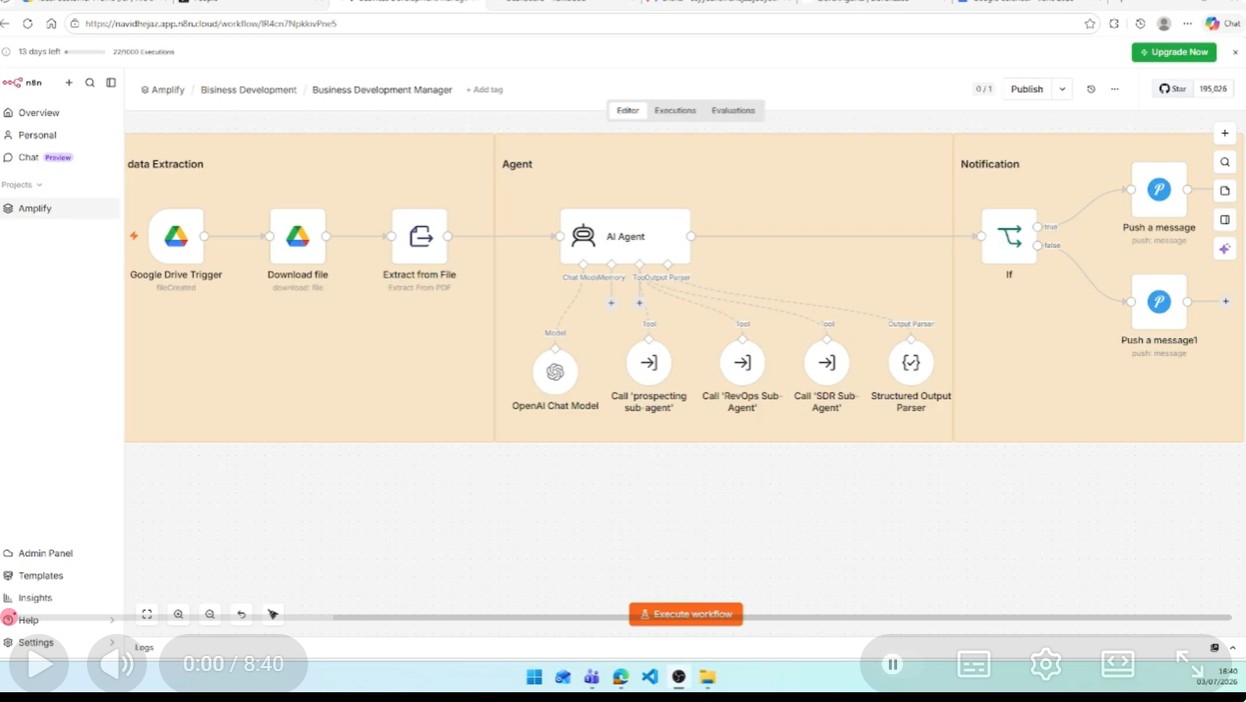
The architecture uses workflow composition rather than placing every action inside one large workflow. The manager agent invokes dedicated sub-workflows as tools, while the voice agent exposes separate webhook tools for deal recording and demo scheduling.
02. Business Development Manager
The Business Development Manager is the orchestrator for the outbound sales pipeline.
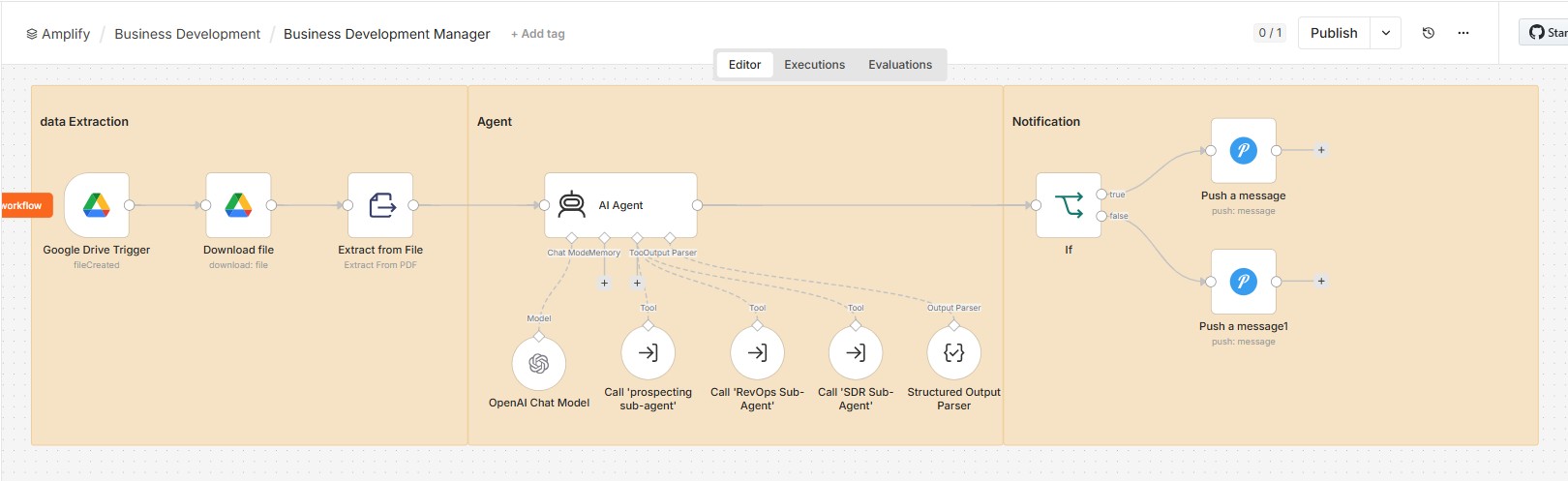
The workflow starts when a new ICP file is created in a monitored Google Drive folder. It then:
- Downloads the uploaded file
- Extracts text from the PDF
- Sends the ICP content to the manager agent
- Calls the Prospecting Sub-Agent once to find multiple prospects
- Calls the RevOps Sub-Agent separately for each qualified prospect
- Calls the SDR Sub-Agent once to create outreach drafts
- Returns a structured success result and concise summary
- Sends a success or failure notification through Pushover
The manager agent is instructed to preserve the order of operations. Prospect discovery happens first, CRM creation happens second, and outreach generation happens only after the leads are available in Pipedrive.
This workflow demonstrates how an AI agent can use other n8n workflows as tools while maintaining a clear orchestration boundary.
03. Prospecting Sub-Agent
The Prospecting Sub-Agent converts the ICP into an online research task and returns two structured prospects.
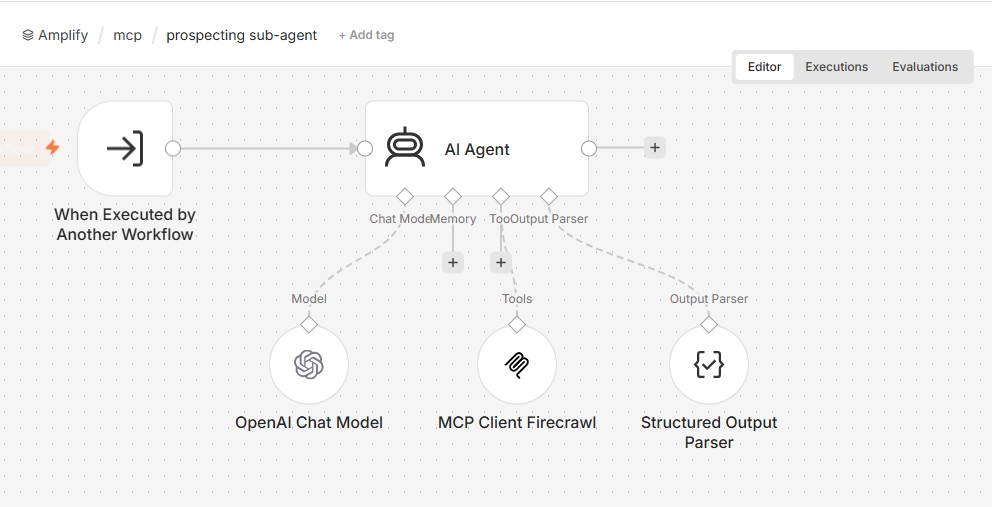
Its responsibilities include:
- Interpreting the ICP search requirement
- Searching the web through the Firecrawl MCP client
- Scraping relevant company or professional pages when necessary
- Identifying likely decision makers
- Finding or predicting a suitable business email address
- Returning source URLs and a qualification rationale
- Producing structured output for downstream workflows
Each returned prospect includes:
first_name
last_name
full_name
company
domain
role
email
email_status
email_score
source_url
rationale
Using a structured output parser ensures that the manager workflow receives predictable fields rather than free-form text.
04. RevOps Sub-Agent
The RevOps Sub-Agent transforms a prospect description into CRM-ready data and creates the corresponding records in Pipedrive.
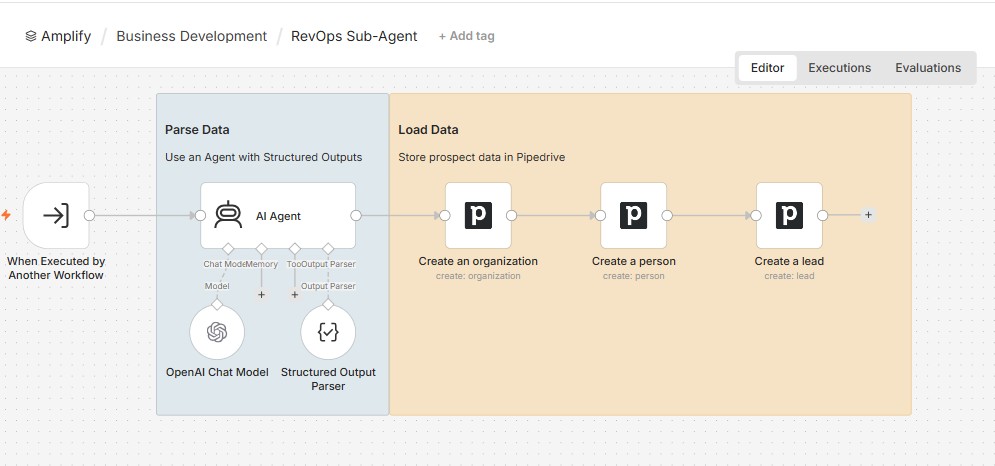
The workflow performs the following sequence:
- Receives a prospect description from the manager workflow
- Extracts the person’s name, company, role, and email into a structured schema
- Creates an organisation in Pipedrive
- Creates a person associated with that organisation
- Creates a lead associated with both records
This separation keeps CRM operations away from the prospecting logic. The prospecting workflow focuses on research, while RevOps focuses on normalisation and system-of-record creation.
The current implementation creates new records from each accepted prospect. Stronger duplicate detection is identified as an important future improvement before production deployment.
05. SDR Sub-Agent
The SDR Sub-Agent prepares outbound sales emails for the contacts stored in Pipedrive.
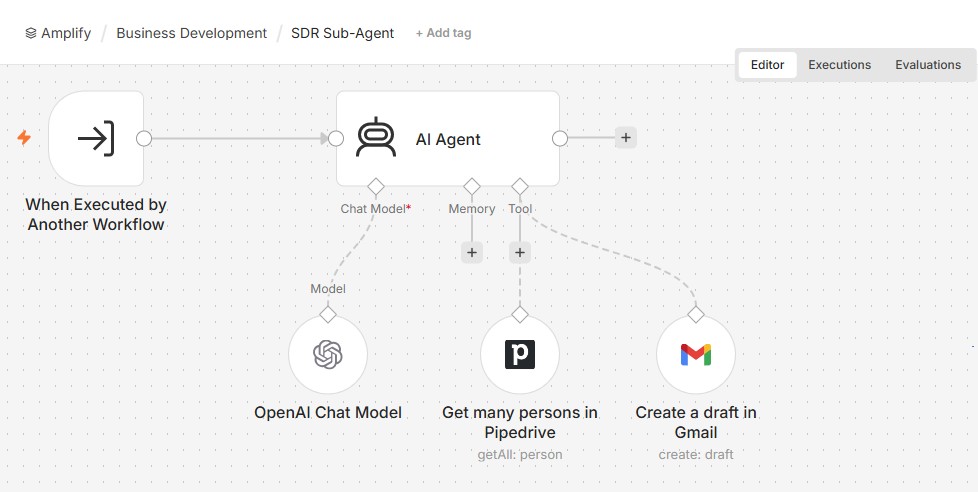
The agent uses two tools:
- A Pipedrive tool to retrieve person records
- A Gmail tool to create an HTML draft for each prospect
The workflow generates a professional subject and email body using only the approved product positioning supplied in the prompt. It does not invent detailed product capabilities that are not available in the workflow context.
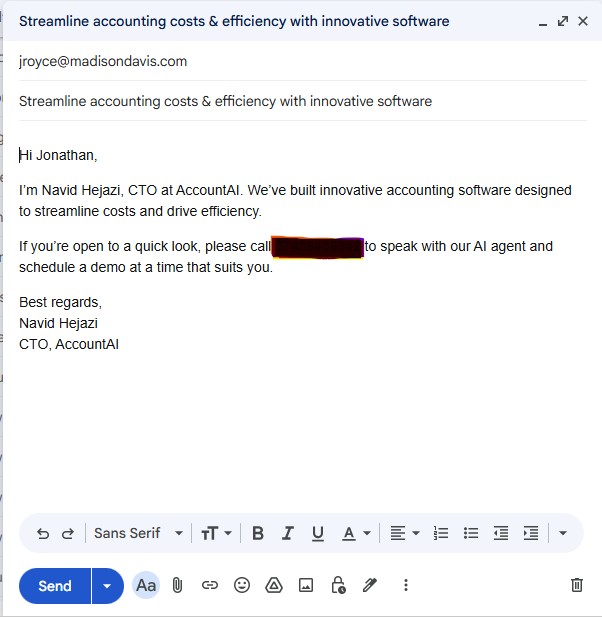
A key design choice is that emails are created as Gmail drafts rather than being sent automatically. This preserves a human review step for recipient details, tone, claims, formatting, and timing.
06. Account Executive Voice Agent
The inbound pipeline uses a voice-based Account Executive Agent to speak with prospects who call after receiving the outreach email.
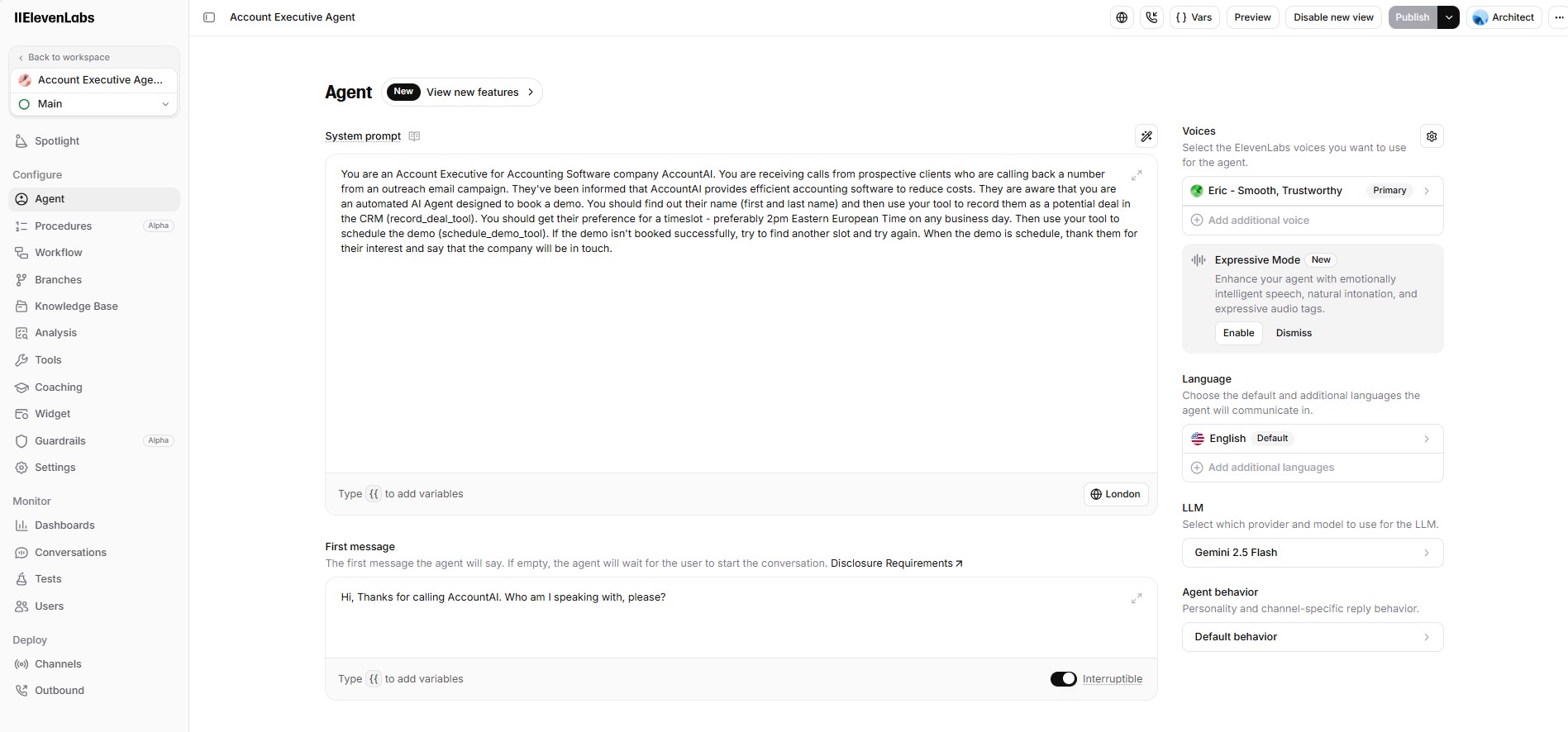
The agent is configured to:
- Introduce itself as the account executive for the product
- Ask for the caller’s first and last name
- Record the caller as a potential deal in the CRM
- Ask for the caller’s preferred demonstration time
- Prefer an agreed business time window where possible
- Invoke the demo scheduling tool
- Try another slot when the requested time is unavailable
- Confirm the outcome naturally during the conversation
The voice layer handles the natural conversation, while the n8n workflows perform the controlled business actions.
Available Voice Tools
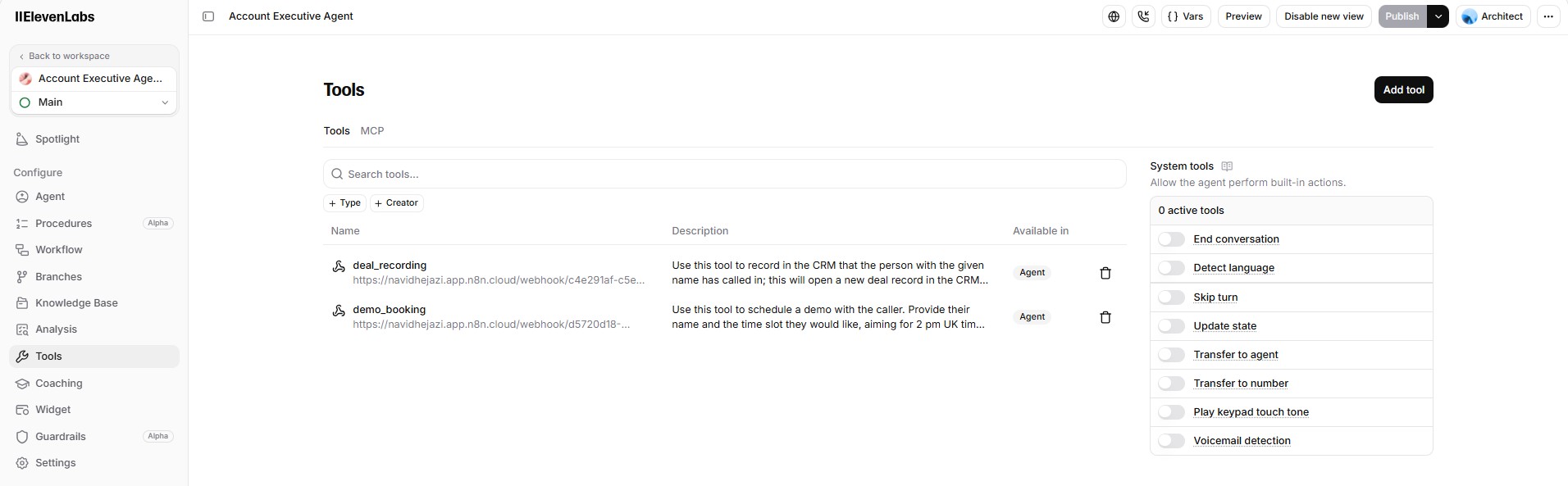
The agent exposes two webhook-backed tools:
deal_recordingdemo_booking
This design prevents the conversational layer from directly manipulating CRM or calendar systems. Instead, each external action passes through a dedicated workflow with its own validation and success path.
07. Deal Recording Sub-Agent
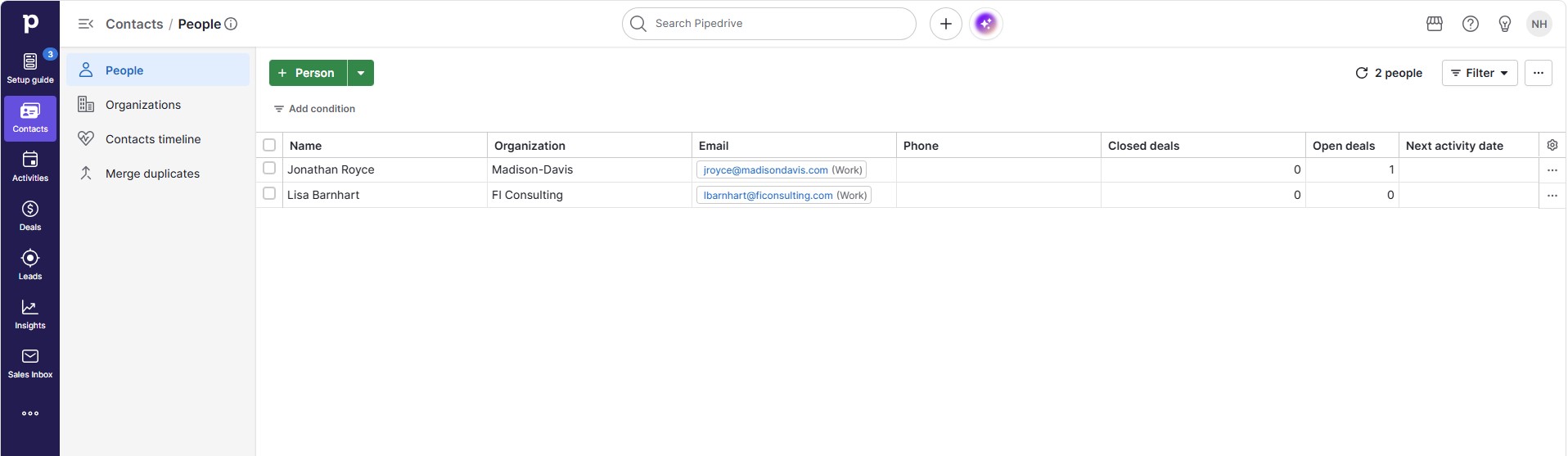
The Deal Recording Sub-Agent receives the caller’s name through a webhook and attempts to associate the inbound opportunity with an existing Pipedrive person.
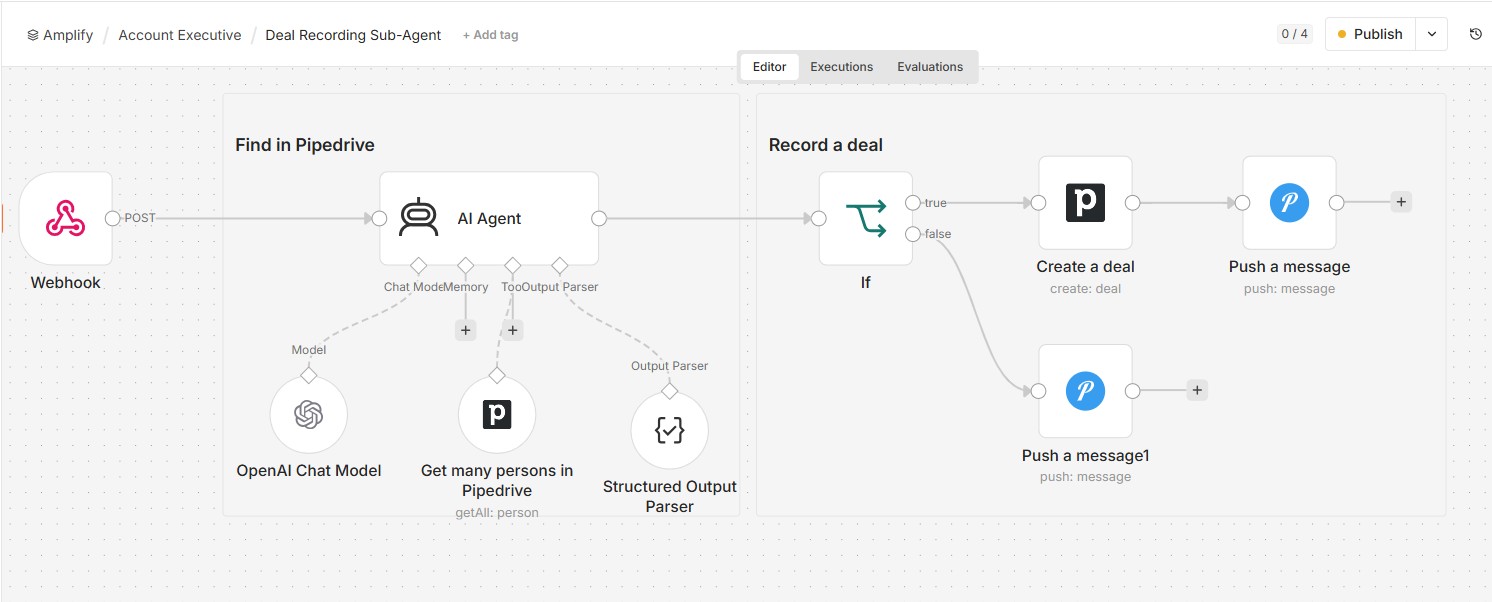
The workflow:
- Receives the caller’s name
- Uses an AI agent with a Pipedrive person lookup tool
- Returns a structured result containing
found,id,company, andname - Checks whether a matching person was found
- Creates a new Pipedrive deal associated with that person
- Sends a success notification when the deal is created
- Sends a failure notification when no valid contact is found
The structured output parser creates a reliable boundary between fuzzy name matching and deterministic CRM actions.
08. Demo Booking Sub-Agent
The Demo Booking Sub-Agent receives the prospect’s name and requested time slot through a webhook.
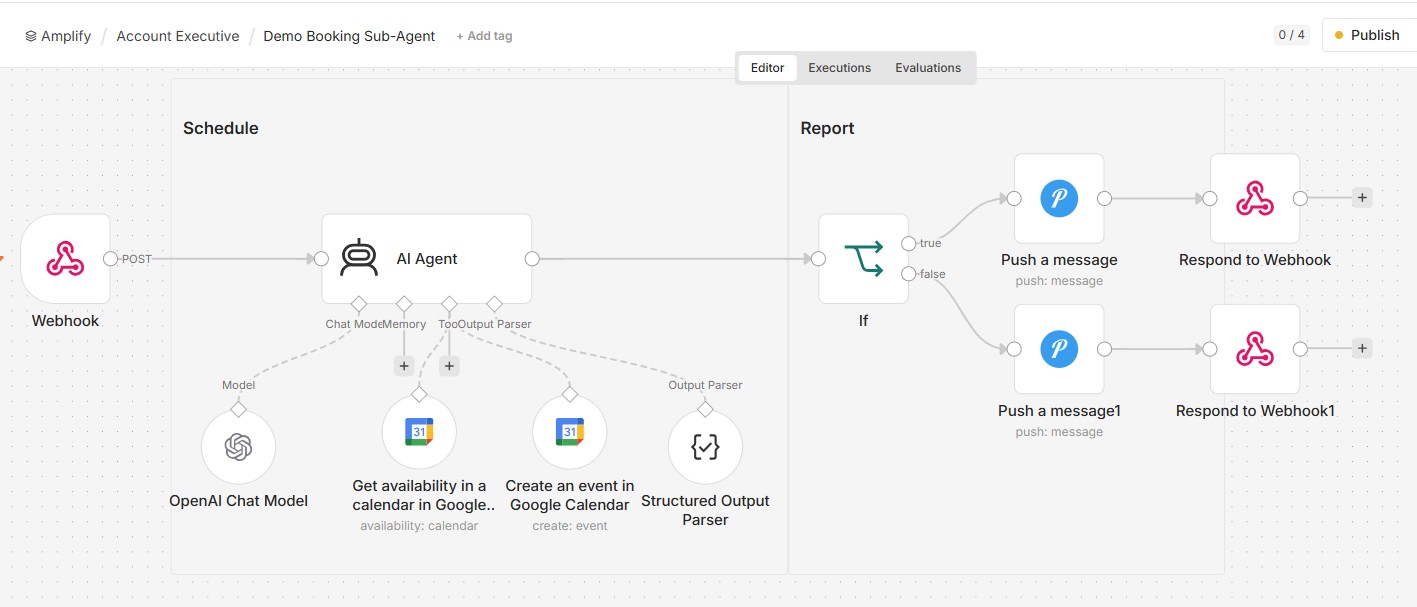
The agent has access to two Google Calendar tools:
- Check availability between a generated start and end time
- Create an event at an available time
The workflow then:
- Interprets the requested time slot
- Checks calendar availability
- Creates the demo event when an appropriate slot is available
- Returns structured output containing
successandsummary - Sends a success or failure Pushover notification
- Responds to the calling voice tool with the booking summary
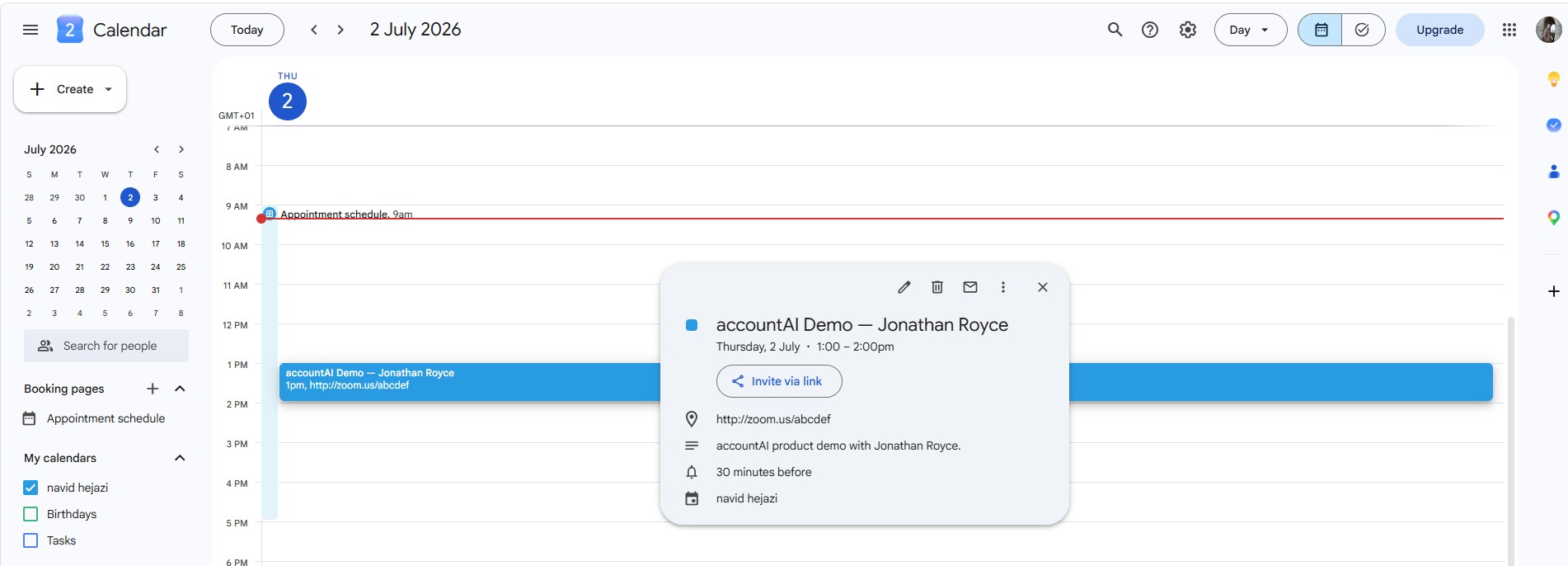
The calendar event includes a summary, description, meeting location, start time, and end time.
09. End-to-End Demonstration
The recorded demonstration follows the complete sales journey:
- An Ideal Customer Profile file is uploaded
- The Business Development Manager starts automatically
- The Prospecting Sub-Agent finds two qualified decision makers
- The RevOps workflow creates the corresponding CRM records
- The SDR workflow generates Gmail drafts
- A selected prospect calls the business
- The voice agent records the caller as a deal
- The caller requests a product demonstration
- Calendar availability is checked
- A Google Calendar event is created
▶ Watch the complete end-to-end demonstration
The demo provides visible evidence across the workflow engine, Gmail, Pipedrive, the voice agent, and Google Calendar rather than showing only isolated workflow screenshots.
10. Reliability, Safety and Human Control
The platform includes several controls to make agent actions more predictable:
- Structured output parsers for prospect, CRM, deal, booking, and manager results
- Separate workflows for each business responsibility
- Explicit success and failure branches
- Pushover notifications for operational outcomes
- Human review of Gmail drafts before sending
- Calendar availability checks before event creation
- CRM lookup before associating an inbound caller with a deal
- Limited product claims in outreach prompts
- Sanitised exported workflow files without reusable production secrets
The workflows automate data handling and preparation, but the current portfolio version still assumes that prospect quality, email accuracy, and generated outreach will be reviewed before production use.
11. Technical Decisions and Trade-Offs
Modular workflows rather than one large automation
Six focused workflows are easier to test, replace, reuse, and understand than a single workflow containing every integration. The trade-off is that data contracts and inter-workflow errors must be managed carefully.
Manager agent with workflow tools
The manager agent chooses when to call prospecting, RevOps, and SDR tools. This enables flexible orchestration, but the result depends on prompt quality and tool-call reliability.
Structured outputs
Structured output parsers reduce ambiguity when agent-generated data is passed into deterministic CRM and calendar nodes. They add schema maintenance and require error handling when a model returns invalid output.
Gmail drafts instead of automatic sending
Creating drafts makes the system safer and keeps a human approval boundary. It also means the workflow does not yet provide a fully unattended outbound sequence.
Voice layer separated from business actions
The voice agent manages the conversation, while n8n webhooks perform CRM and scheduling operations. This improves separation of concerns but introduces network dependency between the conversational platform and n8n.
Google Drive as the ICP trigger
A file-drop trigger is simple for business users and makes the demo intuitive. A production platform may instead use a dedicated authenticated interface with validation, versioning, and job history.
12. Current Limitations
- CRM duplicate prevention is not yet comprehensive in the exported RevOps workflow
- Prospect email quality depends on public data and research-tool results
- The platform does not yet include automatic lead scoring
- Gmail messages are drafted but not managed through follow-up sequences
- There is no unified dashboard for workflow status and sales analytics
- Voice conversation evaluation and transcript analytics are not yet included
- Failure handling is primarily notification-based
- Workflow credentials and production webhook configuration require manual setup
- Calendar preferences are prompt-driven rather than governed by a dedicated scheduling policy service
- The current implementation is a portfolio prototype rather than a multi-tenant production SaaS platform
13. Growth & Next Steps
The strongest future improvements would be:
- Add exact and fuzzy duplicate detection before creating organisations, people, leads, or deals
- Introduce automatic lead scoring and prioritisation
- Add email verification and confidence thresholds
- Create approval gates for selected prospects and email drafts
- Add automated follow-up sequences with stop conditions
- Build a unified dashboard for prospects, executions, errors, calls, and booked demos
- Add conversation transcripts, summaries, and quality evaluation
- Support multiple CRM providers
- Add Slack or Microsoft Teams notifications
- Add multilingual voice conversations
- Introduce role-based authentication and per-user data separation
- Add retry policies and dead-letter handling for failed workflows
- Add end-to-end automated tests using mocked integration services
- Add tracing, cost monitoring, and workflow-level performance metrics
This project demonstrates my ability to combine agent orchestration, workflow automation, online research, structured LLM outputs, CRM operations, email generation, voice interaction, and calendar scheduling into one connected AI sales platform.
Technology Stack
n8n · OpenAI · Firecrawl MCP · Pipedrive · Gmail API · Google Calendar · Google Drive · Pushover · Voice AI · Webhooks · Structured Outputs
This project is a portfolio demonstration of agentic sales automation. Prospect data, outreach content, CRM actions, and generated appointments should be reviewed and adapted before production deployment.