
I built a cloud-deployed, multi-agent software engineering platform that converts a natural-language software requirement into a runnable Flask application, automated tests, and a structured set of engineering reports.
The platform coordinates seven specialist AI agents across requirements analysis, architecture, backend development, frontend development, testing, debugging, and final code review. I then extended the original CrewAI workflow into a production-oriented AWS architecture with asynchronous job processing, isolated execution, live progress tracking, retry handling, and private output storage.
🔗 Project Links
- GitHub Repository: Agentic Software Engineering Crew
- Video Demonstration: Watch the complete end-to-end demo on YouTube
Table of Contents
- 00. Project Overview
- 01. System Architecture
- 02. Asynchronous Cloud Workflow
- 03. Seven-Agent Engineering Crew
- 04. Agent Tools and Structured Outputs
- 05. Generated Application and Reports
- 06. Reliability, Isolation, and Security
- 07. Equipment Booking Demonstration
- 08. Local and Cloud Execution
- 09. Technical Decisions and Trade-Offs
- 10. Current Limitations
- 11. Growth & Next Steps
00. Project Overview
Context
Generating code from a prompt is only one part of software engineering. A useful system must first interpret the requirement, define an architecture, implement connected backend and frontend components, create tests, respond to failures, review the corrected result, and make the artefacts available in a controlled way.
Long-running AI workflows also create deployment challenges. Keeping the browser request open while several agents generate and test an application is fragile and difficult to scale. Jobs need persistent state, isolated workspaces, retry behaviour, progress visibility, and secure output storage.
The goal of this project was therefore to build an end-to-end agentic software engineering platform rather than a single code-generation prompt.
Actions
I designed and implemented a platform that:
- Accepts a natural-language application requirement through a Flask web interface
- Validates the input and creates a persistent job record
- Places long-running generation work onto an Amazon SQS queue
- Processes queued jobs in a separate ECS Fargate worker service
- Coordinates seven specialist agents using a sequential CrewAI workflow
- Gives agents controlled file-reading, file-writing, and pytest execution tools
- Creates a separate isolated workspace for every job
- Writes live status, current stage, and progress messages to DynamoDB
- Generates modular Flask backend and frontend source code
- Creates and executes automated pytest tests
- Uses a debugging agent to inspect failures, revise files, and rerun tests
- Produces a final engineering review after validation
- Packages the application and engineering reports into separate ZIP archives
- Uploads both archives to a private Amazon S3 bucket
- Provides secure download options when the job is complete
- Supports local execution as well as containerised AWS deployment
Results
The completed platform demonstrates the full journey from an unstructured user requirement to a downloadable and runnable application.
In the recorded AWS demonstration:
- The requirement was submitted successfully through the browser
- The job moved through all seven specialist agent stages
- Live progress was displayed while the worker processed the request
- The final job state reached
COMPLETED generated_app.zipandgeneration_reports.zipwere created- Both archives were stored in S3 and downloaded successfully
- The generated project was inspected in Visual Studio Code
- The generated Flask application ran locally
- The principal equipment-booking workflows were functionally tested
The result is not only generated source code. It is a traceable package containing implementation files, tests, debugging evidence, and specialised engineering reports.
Growth / Next Steps
The next stage would add user authentication, queue-based autoscaling, richer observability, real-time progress events, human approval gates, additional framework targets, and optional deployment of generated applications.
01. System Architecture
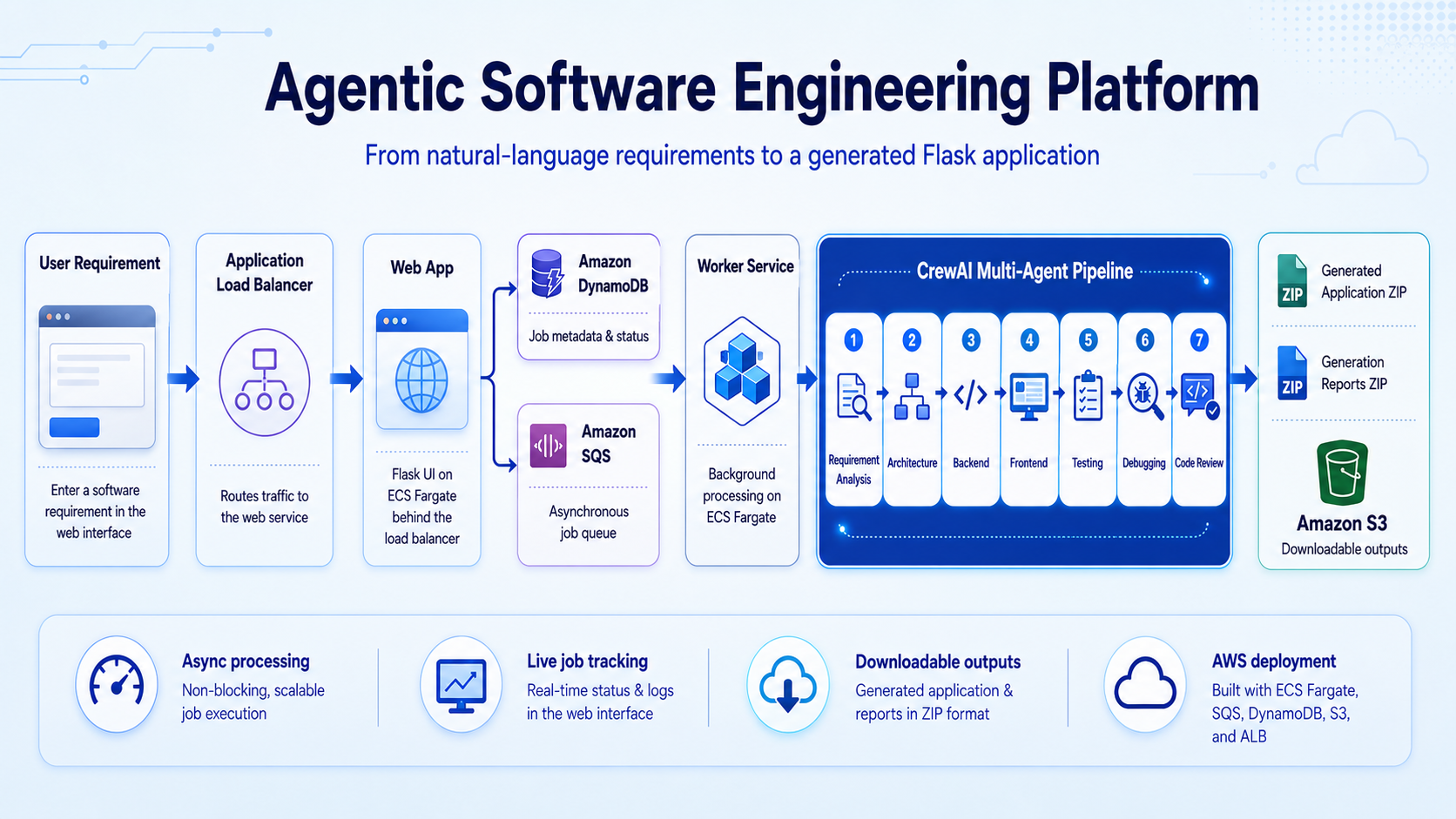
The deployed system separates interactive web traffic from long-running AI generation work.
| Component | Responsibility |
|---|---|
| Application Load Balancer | Routes browser traffic to the web service |
| ECS Fargate Web Service | Serves the UI, validates requests, creates jobs, and returns status |
| Amazon SQS | Decouples user submission from the generation workload |
| ECS Fargate Worker Service | Claims queued jobs and runs the multi-agent workflow |
| Amazon DynamoDB | Stores job state, stage, progress messages, and output metadata |
| Amazon S3 | Privately stores generated application and report archives |
| Amazon ECR | Stores the shared Docker image used by both ECS services |
| AWS Secrets Manager | Supplies external API credentials securely |
| Amazon CloudWatch | Stores container logs and operational events |
| AWS IAM | Controls communication between tasks and AWS services |
The web and worker services use the same container image from Amazon ECR. The worker service overrides the default container command to run the background worker process.
02. Asynchronous Cloud Workflow
When the user selects Generate Application, the platform follows this sequence:
- The web service validates the natural-language requirement
- A unique job ID is generated
- The initial job record is stored in DynamoDB
- A message containing the job information is sent to SQS
- The browser is redirected to a live status page
- The ECS worker receives and claims the queued job
- A job-specific workspace is created
- CrewAI runs the seven-agent workflow
- Progress and the current agent stage are written back to DynamoDB
- The finished application is packaged as
generated_app.zip - The engineering evidence is packaged as
generation_reports.zip - Both archives are uploaded to private S3 storage
- The completed status page exposes secure download options
The browser does not stay blocked during generation. It polls the backend for the latest persisted state, which makes the interface more resilient to a long-running AI task.
Jobs can move through the following high-level states:
QUEUED → RUNNING → COMPLETED
                 ↘ RETRYING
                 ↘ FAILED
03. Seven-Agent Engineering Crew
The CrewAI workflow is sequential because every stage depends on the artefacts produced before it.
| Stage | Specialist agent | Main responsibility |
|---|---|---|
| 1 | Requirement Analyst | Converts the request into requirements, stories, criteria, risks, and assumptions |
| 2 | Software Architect | Defines the stack, modules, data model, API, UI behaviour, validation, and test strategy |
| 3 | Backend Engineer | Generates Flask backend modules, routes, models, dependencies, and setup instructions |
| 4 | Frontend Engineer | Creates responsive HTML, CSS, and vanilla JavaScript connected to the API |
| 5 | Test Engineer | Builds pytest coverage for workflows, invalid input, business rules, and edge cases |
| 6 | Debugging Engineer | Runs tests, analyses failures, edits defective files, and reruns validation |
| 7 | Code Reviewer | Reviews requirement coverage, correctness, maintainability, security, and remaining gaps |
Context flows forward between the agents. Requirements guide the architecture, the architecture guides implementation, tests validate the generated behaviour, debugging responds to real test output, and final review assesses the corrected application.
The project supports different models and providers for different roles, allowing reasoning-intensive and implementation-intensive stages to use suitable model profiles.
04. Agent Tools and Structured Outputs
The agents do not only return chat messages. They use controlled project tools to work with the generated application:
- File Writer Tool creates or replaces source files inside the active job workspace
- File Reader Tool inspects generated implementation and test files
- Test Runner Tool executes pytest and returns the actual test output to the debugging process
Agent and task behaviour is defined through structured CrewAI configuration files:
src/agentic_software_engineering_crew/
├── config/
│   ├── agents.yaml
│   └── tasks.yaml
├── tools/
│   ├── file_writer_tool.py
│   ├── file_reader_tool.py
│   └── test_runner_tool.py
├── crew.py
└── main.py
This separates agent instructions, task definitions, orchestration logic, and executable tools, making the workflow easier to understand and extend.
05. Generated Application and Reports
Each successful job creates two archives so that runnable source code remains separate from process documentation.
Generated application
generated_app.zip
└── generated_app/
    ├── app.py
    ├── models.py
    ├── routes.py
    ├── requirements.txt
    ├── README.md
    ├── templates/
    │   └── index.html
    ├── static/
    │   ├── css/style.css
    │   └── js/app.js
    └── tests/
        └── test_app.py
Engineering reports
generation_reports.zip
├── requirements_analysis.md
├── architecture.md
├── backend_summary.md
├── frontend_summary.md
├── test_summary.md
├── debugging_report.md
└── code_review.md
This design gives the user a clean application package while retaining visibility into what every engineering stage produced.
06. Reliability, Isolation, and Security
The cloud version adds safeguards for long-running and potentially failing generation work.
Reliability
- SQS long polling for efficient worker operation
- Extended message visibility for long-running jobs
- Controlled retry limits and explicit retry state
- Persistent status updates in DynamoDB
- Output validation before a job is marked complete
- Exception and operational logging in CloudWatch
- Optional dead-letter queue support for repeatedly failing messages
Isolation
- Every job receives a separate workspace
- Generated files are packaged from that job-specific directory
- Workspace cleanup prevents outputs from different requests being mixed
- One worker processes one job at a time in the current release
Security
- Output archives are stored in a private S3 bucket
- API credentials are supplied through AWS Secrets Manager
- ECS services use IAM task roles and least-privilege access
- Secrets are not stored in the repository or container definition
- Generated applications are treated as MVPs requiring human review before production use
07. Equipment Booking Demonstration
The latest end-to-end demonstration asked the platform to generate an Equipment Booking Management application.
The submitted requirement asked for a system that could:
- Add equipment with a name, category, and availability status
- Display all equipment in a responsive browser dashboard
- Book an available item for a staff member
- Store booking and expected return dates
- Prevent an unavailable item from being booked again
- Mark booked equipment as returned
- Filter equipment by category and availability
- Display success and error messages
- Reset the sample data
- Expose JSON API endpoints with clear validation and HTTP status codes
- Include automated pytest tests and local setup instructions
The demonstration then follows the job through AWS, downloads both archives, opens the generated code, starts the application with python app.py, and verifies its primary workflows.
▶ Watch the complete AWS demonstration
08. Local and Cloud Execution
The project supports two execution modes.
| Mode | Purpose | Output location |
|---|---|---|
| Local web and worker processes | Development and workflow testing without AWS deployment | Local outputs/ directory |
| ECS Fargate web and worker services | Asynchronous cloud execution with persisted state and private downloads | Amazon S3 |
| Direct CrewAI execution | Runs the engineering crew without the browser interface | Configured output directory |
The shared Docker image makes the deployed services consistent, while separate runtime commands preserve the boundary between interactive request handling and background generation.
09. Technical Decisions and Trade-Offs
Sequential rather than parallel agents
The workflow prioritises dependency correctness: requirements precede architecture, implementation precedes testing, and test evidence precedes debugging and review. This is easier to trace, although it increases total generation time.
Queue-based processing
SQS prevents the browser request from owning the lifetime of the AI workflow. It also creates a path toward future horizontal worker scaling, but introduces distributed state and retry concerns.
Polling for live progress
Browser polling is straightforward and works with persisted DynamoDB state. WebSockets or Server-Sent Events could provide faster updates with less repeated traffic in a future release.
Separate application and report archives
Two archives make the generated project cleaner for the user while preserving detailed engineering evidence. This requires additional packaging and output metadata compared with a single download.
Human review remains necessary
Automated tests, debugging, and code review improve the generated result, but they do not prove production readiness. Security review, broader test coverage, and environment-specific adaptation remain human responsibilities.
10. Current Limitations
- Jobs are not yet associated with authenticated users
- A worker task processes one job at a time
- Generation cost varies with selected models and providers
- Live progress currently uses polling rather than WebSockets or Server-Sent Events
- Generated applications are MVPs and still require human review
- Generated test coverage may require manual expansion
- The agent workflow is sequential
- Generated applications are not automatically deployed
- S3 lifecycle and retention policies require separate configuration
- Full production observability, alerting, and dashboards are not yet implemented
11. Growth & Next Steps
The strongest next improvements would be:
- Add authentication, job ownership, and per-user generation history
- Scale worker tasks automatically using SQS queue depth
- Add dead-letter queue monitoring and replay controls
- Replace polling with WebSockets or Server-Sent Events
- Add CloudWatch dashboards, alarms, cost metrics, and distributed tracing
- Add human approval gates between selected agent stages
- Generate Dockerfiles and optional deployment configurations for output applications
- Support FastAPI, Django, React, and Next.js project targets
- Add Playwright-based frontend testing
- Offer fast, balanced, and premium model profiles
- Estimate generation cost before submission
- Add CI/CD and Infrastructure as Code for the platform
- Introduce hierarchical supervision or targeted routing back to the agent responsible for a failed stage
This project demonstrates my ability to combine agent orchestration, full-stack development, automated testing, containerisation, asynchronous cloud architecture, and AWS services into a single end-to-end AI engineering platform.
Technology Stack
Python · Flask · CrewAI · pytest · Docker · Amazon ECS Fargate · Application Load Balancer · Amazon SQS · Amazon DynamoDB · Amazon S3 · Amazon ECR · AWS Secrets Manager · Amazon CloudWatch · AWS IAM
This is a portfolio and research-style demonstration of agentic software engineering. Generated applications must be reviewed, tested, secured, and adapted before production use.