
Human-in-the-Loop Cold Email Agent Workflow
In this project, I built a human-in-the-loop AI workflow that researches a target company, generates a personalised cold email, reviews and improves the draft, and creates a Gmail draft for final manual approval.
The application combines the OpenAI Agents SDK, Tavily MCP, Gmail API, Pydantic, and Gradio. It is intentionally designed not to send emails automatically, keeping the final decision under user control.
🔗 Project Links
- GitHub Repository: https://github.com/seyyednavid/cold-email-agent-workflow
Table of Contents
- 00. Project Overview
- 01. System Architecture
- 02. Agent Workflow
- 03. Company Research with Tavily MCP
- 04. Email Generation and Review
- 05. Human-in-the-Loop Approval
- 06. Gmail Draft Creation
- 07. Safety, Validation and Tracing
- 08. Application Walkthrough
- 09. Growth & Next Steps
00. Project Overview
Context
Cold outreach often requires several manual steps: researching a company, identifying a relevant business challenge, writing a personalised message, checking its quality, and preparing it for sending.
Fully automated outreach can introduce risks such as unsupported claims, generic messaging, spam-heavy language, and emails being sent without human review.
The goal of this project was to build an agentic outreach assistant that automates research and drafting while preserving a clear human approval step.
Actions
I designed and implemented a workflow that:
- Collects lead, recipient, and sender information through a Gradio interface
- Researches the target company using Tavily through the Model Context Protocol (MCP)
- Uses fallback research methods if the primary research tool is unavailable
- Generates a personalised cold email from the lead data and research findings
- Reviews the draft for clarity, personalisation, unsupported claims, spam risk, and CTA quality
- Improves the email when the initial draft does not meet the required standard
- Returns structured scores and a readiness decision
- Lets the user edit and approve the final content
- Creates a Gmail draft through the Gmail API without sending it automatically
Results
The final application provides an end-to-end assisted outreach workflow with:
- Multi-agent orchestration using the OpenAI Agents SDK
- External company research through Tavily MCP
- Structured outputs and validation using Pydantic
- Visible quality, spam-risk, and readiness assessments
- Editable subject and email body fields
- Manual approval before Gmail draft creation
- Gmail integration that creates drafts without automatic sending
- Workflow inspection and debugging through OpenAI tracing
Growth / Next Steps
Potential future enhancements include:
- Automated tests for fallback routing, validation, and readiness decisions
- Contact enrichment and CRM integration
- Configurable writing styles for different industries and audiences
- Draft history and evaluation analytics
- Stronger source citation for company research
- Deployment with authentication and secure multi-user credential handling
01. System Architecture
The system separates the user interface, agent workflow, external research, validation, and Gmail draft creation.
At a high level:
- The user enters lead and sender details in Gradio
- The manager agent coordinates research, writing, review, and improvement tools
- Tavily MCP provides external company research
- Pydantic models validate structured workflow outputs
- The application displays the final draft and review decision
- After manual approval, the Gmail API creates a draft in the user’s mailbox
02. Agent Workflow
The outreach manager coordinates a sequence of specialised agents and tools:
- Company Research Agent — summarises the company, likely challenges, personalisation points, and a suitable email angle
- Email Writer Agent — produces the initial subject line and email body
- Email Reviewer Agent — checks quality, claims, tone, CTA placement, personalisation, and spam risk
- Email Improver Agent — revises drafts using the review feedback
- Readiness Decision — determines whether the result is ready for Gmail draft creation
This separation keeps each step focused and makes the workflow easier to inspect and improve.
03. Company Research with Tavily MCP
The research stage uses Tavily MCP to gather relevant public information about the target company.
The research output includes:
- A concise company summary
- Likely operational or commercial challenges
- Relevant personalisation points
- A recommended outreach angle
- Source notes and the research method used
The workflow is designed with fallback behaviour so the application can still produce a cautious result when external research is unavailable. In that case, it relies only on the information supplied by the user and avoids inventing facts.
04. Email Generation and Review
The writer agent combines the lead information, research findings, sender offer, and credibility notes to generate a concise cold email.
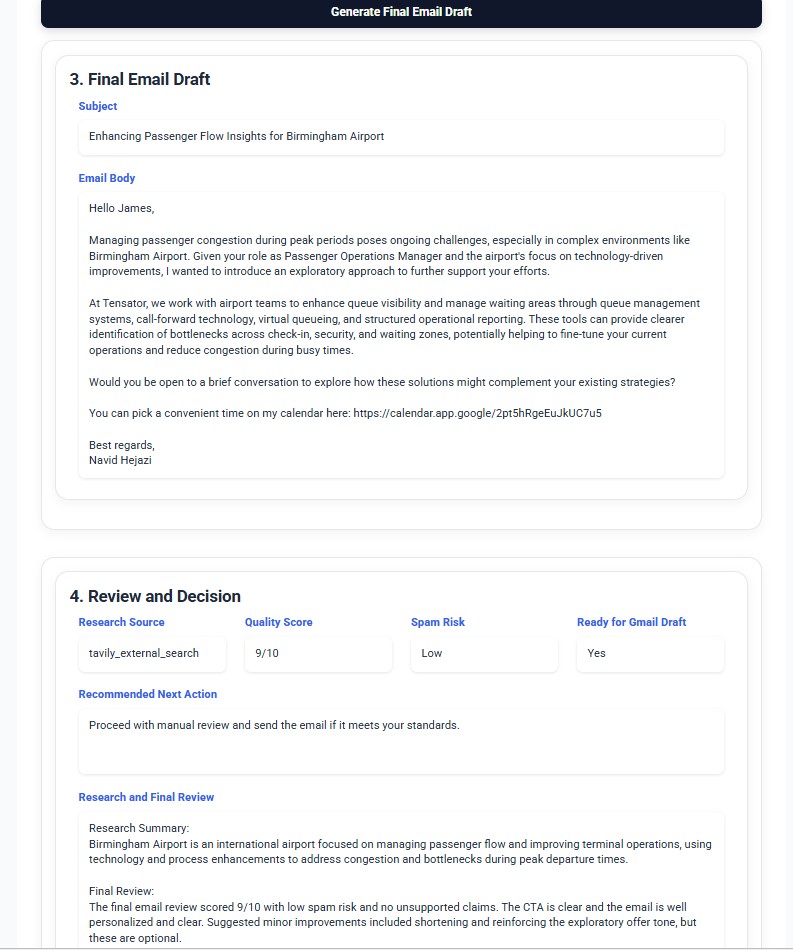
The reviewer evaluates the message for:
- Relevance and personalisation
- Unsupported or exaggerated claims
- Clarity and readability
- Spam-heavy or overly aggressive wording
- Strength and placement of the call to action
- Generic phrasing and formatting issues
The application displays the review results alongside the draft so the user can understand why a message is or is not ready. Both the generated email and its review decision are shown in the screenshot above.
05. Human-in-the-Loop Approval
Human control is a core design decision in this project.
Before creating a Gmail draft, the user can:
- Review the research source
- Inspect the quality score and spam-risk assessment
- Read the recommended next action
- Edit the final subject line
- Edit the email body
- Approve draft creation manually
The workflow never sends an email automatically. Even when the system marks a message as ready, the user remains responsible for the final review and sending decision.
06. Gmail Draft Creation
After the user reviews and approves the final content, the application uses the Gmail API to create a draft.
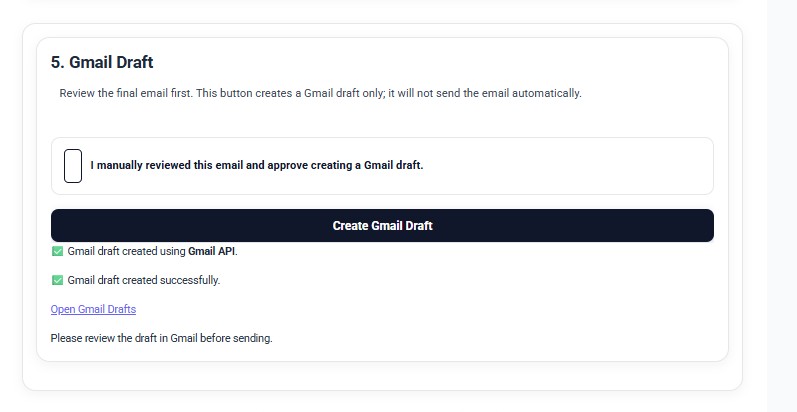
The generated message appears in the user’s Gmail Drafts folder, where it can be checked again, edited, scheduled, or deleted before sending.
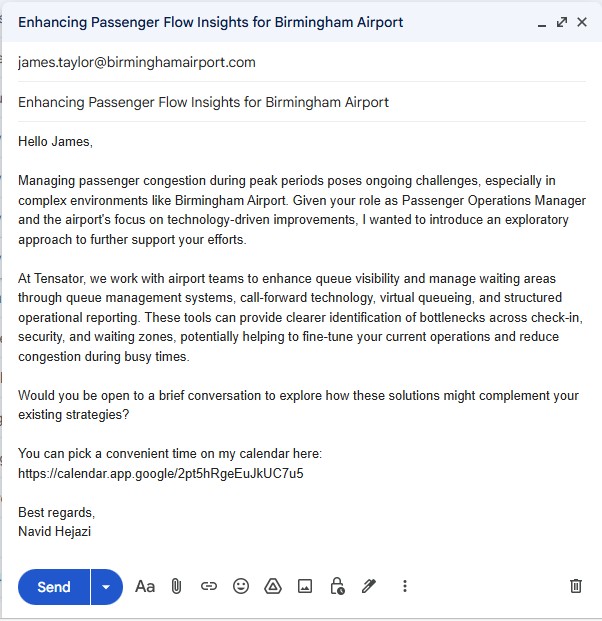
Using Gmail drafts provides a reliable boundary between AI-assisted content creation and the external action of sending an email.
07. Safety, Validation and Tracing
The project includes safeguards to improve reliability and make agent behaviour easier to inspect:
- Pydantic schemas for structured inputs and outputs
- Unsupported-claim detection
- Spam-risk assessment
- Quality scoring and readiness decisions
- Visible research-source information
- Manual approval before Gmail draft creation
- No automatic email sending
- OpenAI tracing for tool calls, execution flow, latency, and errors
The prompts also instruct the agents to avoid fabricated statistics, fake case studies, guaranteed results, and claims that are not supported by the available research or user input.
08. Application Walkthrough
The Gradio interface provides a guided workflow for entering lead and sender information.
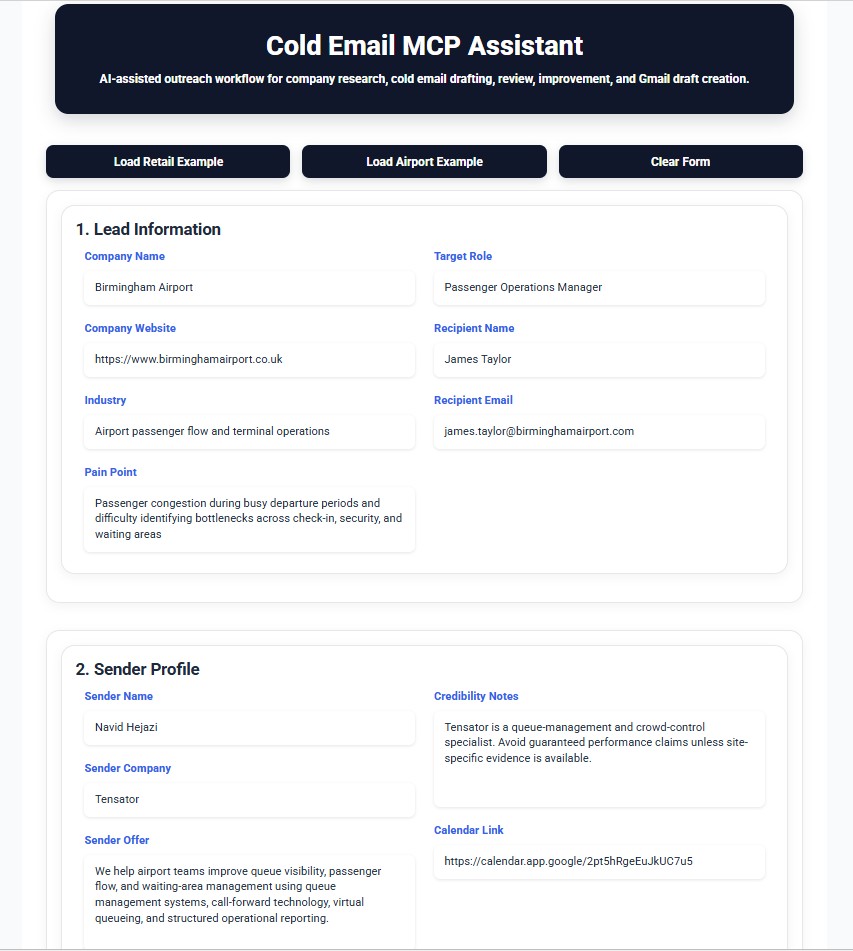
The user provides:
- Company name, website, and industry
- Business pain point and target role
- Recipient name and email address
- Sender name, company, offer, and credibility notes
- An optional calendar link
After the workflow runs, the application presents the research summary, editable final email, review metrics, and Gmail-draft controls in one interface.
09. Growth & Next Steps
This project demonstrates how agentic workflows, external tools, structured validation, and human approval can be combined to support safer business automation.
The same design can be extended to:
- CRM-assisted prospecting
- Account research assistants
- Sales-development workflows
- Recruitment outreach
- Partnership and supplier communication
Future work will focus on automated testing, richer research citations, CRM integration, evaluation across different email scenarios, and secure deployment for multiple users.